The estate you have now
If you lead reporting inside an Australian organisation, your Power BI content has probably drifted onto Microsoft Fabric over the past year. Semantic models, a lakehouse or two, a few pipelines, and a growing pile of workspaces. You are the person who gets the call when a dashboard is stale or a number looks wrong.
Microsoft ships changes to Power BI and Fabric every month. Most months you skim the headline and move on. The August and September 2026 releases are different. A few items change how your models refresh, how you recover lost items, and how your data is governed. This post covers what touches your estate and what to check now.
Two deprecations that force a decision
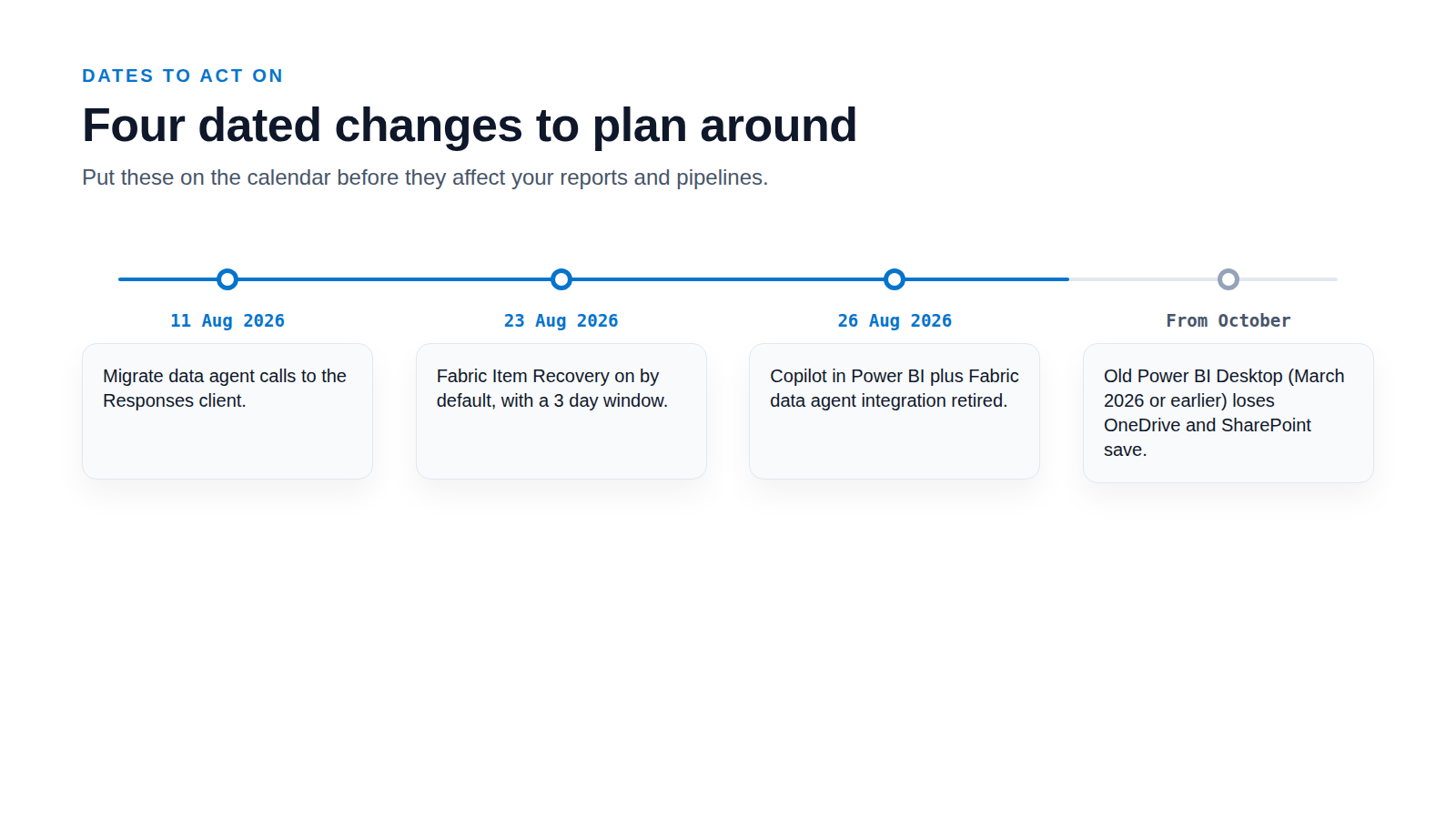
The first change is a deprecation with a date. Starting in October, Power BI Desktop versions from March 2026 or earlier will no longer be able to save and share files to OneDrive and SharePoint. Microsoft's fix is plain: update Power BI Desktop to keep that working. If your team runs an old build, patch it before October or saving will fail.
The second change retires a Copilot feature. Beginning 26 August 2026, the integration between Copilot in Power BI and Fabric data agents is retired, so Copilot in Power BI no longer connects directly to Fabric data agents. The reason is upstream: the integration was built on the OpenAI Assistants API, and that API is scheduled to shut down on 26 August 2026. Fabric data agents themselves stay available through other supported experiences.
If you call a data agent in code, there is a migration. Users querying a data agent with the Fabric OpenAI client can start moving to the Fabric OpenAI Responses client from 11 August 2026, before the Assistants API deprecation takes effect. Microsoft says SDK and portal users need little or no action because it migrates those experiences internally, though conversation history may reset once.
Refresh control you should actually use
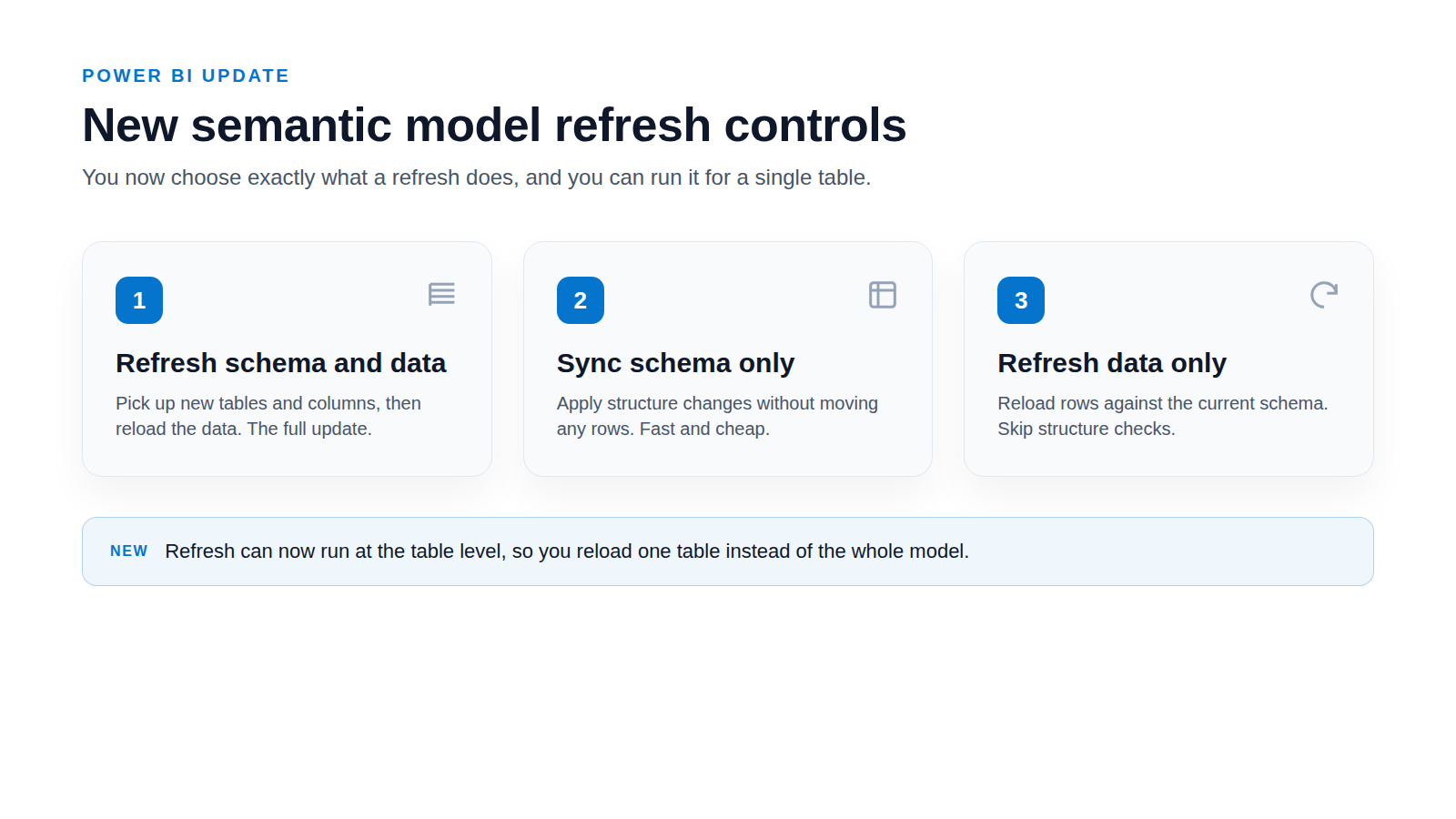
Refresh gets more precise. The Refresh button in the Power BI Service now offers three options: Refresh schema and data, Sync schema only, and Refresh data only. You can also run refresh operations at the table level rather than across the whole model.
This matters for cost and reliability. If only your data changed, Refresh data only skips the schema work. If one table is the problem, a table level refresh fixes it without reprocessing the model. Used well, you cut refresh time and reduce the chance of a full refresh failing on a single bad table.
Recovery is on by default now
Recovery is now on by default. From 23 August 2026, Fabric automatically enables Item Recovery for tenants that have not configured the setting. That establishes a 3 day recovery window for supported item types. If you deleted an item and assumed it was gone, you may now have three days to get it back.
Warehouses get their own safety net. Dropped warehouse recovery lets you restore an accidentally dropped warehouse from the Workspace Recycle Bin, with a 7 to 90 day retention window. It brings back schemas, data, snapshots, permissions, views and stored procedures. Check what retention your tenant is set to, and confirm your team knows the Recycle Bin exists before they need it.
Governance and data quality are catching up
Governance and data quality are catching up, mostly in preview. Centralized data governance in the OneLake catalog gives aggregated insights on the items you have created, with recommended governance actions. DLP can now restrict access for structured data in OneLake, covering SQL databases, KQL databases and warehouses. DSPM for AI watches sensitive information in the prompts and responses of Fabric Copilots and data agents.
Two cost and monitoring features reached general availability. OneLake item-size reporting gives a workspace storage report that breaks down item data, system data and soft-deleted data. OneLake storage tiers and lifecycle management let you move less-used data to cooler tiers with policies. One caveat: the governance items above are in preview, so test them before you rely on them, while the storage reporting and tiers are generally available.
A short checklist for this quarter
- Patch Power BI Desktop on any machine running a March 2026 or earlier build, before the October save deprecation.
- Find any code that calls a Fabric data agent and plan the move to the Responses client.
- Review your refresh strategy and switch suitable models to Refresh data only or table level refresh.
- Confirm your Item Recovery and warehouse retention settings, and tell your team the Recycle Bin exists.
- Turn on the OneLake governance and storage insights, and decide which to trust now versus after preview.
- Set up monitoring across workspaces so refresh failures and gaps surface in one place, not in a user complaint.
- 3 days
- Item Recovery default window
- 7 to 90 days
- Dropped warehouse recovery retention
- 3, plus table level
- Semantic model refresh options now
- 26 August 2026
- Copilot data agent retirement
What we would do about it
Most of these changes share a root problem: you cannot act on what you cannot see across a growing estate. A save that breaks on one old Desktop, a model that fails on one table, a warehouse someone dropped, a governance gap in one workspace. Each is small on its own. Together they are why a user often finds the problem before you do.
Sources
- See What's New in the August 2026 Power BI Update (accessed 2026-09-07)
- What's new in Microsoft Fabric (accessed 2026-09-07)
- Retirement of Fabric data agent integration in Copilot in Power BI (accessed 2026-09-07)
- Consume a data agent using the Fabric OpenAI client in Python (accessed 2026-09-07)